
Building a Complete Next.js Webinar Management Platform
- Content by:
- Govind
- Published:
The platform was developed for the IndUS Energy Efficiency Initiative (IEEI), an Indo-US collaboration involving IIT Roorkee and Oregon State University. The initiative focuses on industrial energy efficiency, waste energy recovery, clean technologies, and AI-based optimization.
The project required more than a conventional informational website. It needed a connected digital experience where visitors could understand the initiative, discover webinars, register as attendees, and apply to participate as speakers.
ArtographerTacts designed and developed the platform from the ground up, combining a public-facing website with a separate administration dashboard. The solution also connects registration workflows, webinar management, email automation, and technical SEO into one maintainable web application.
The Challenge: Connecting Webinar Discovery, Registration, and Administration
The platform needed to support different audiences and operational workflows without making the experience complicated for visitors or administrators. A public website alone would not be enough; the underlying system also needed to manage webinar information, participant data, speaker applications, and ongoing communications.
A clear public-facing experience : Visitors needed an accessible way to understand the initiative, explore its team and activities, find upcoming webinars, and access relevant information.
Separate attendee and speaker journeys : The platform needed dedicated registration workflows for attendees and speakers, each collecting information relevant to their participation.
Centralized webinar administration : Administrators needed a dashboard to manage webinar information, participant records, speaker applications, messages, and related operational details.
Reliable communication workflows : Registration confirmations, speaker updates, webinar notifications, and scheduled reminders needed to be handled through a consistent email system.
A foundation for search visibility : The website needed structured page metadata, relevant structured data, and a dynamic sitemap to support search engine discovery of its pages and webinar content.
The Solution: A Connected Website and Custom Management System
ArtographerTacts developed a full-stack application around the complete webinar lifecycle. The public website handles discovery and participation, while the separate dashboard provides authorized users with the tools to manage the information and workflows behind each webinar.
Public website and initiative information : The website presents the initiative, its team, contact information, and webinar content through dedicated pages and a consistent navigation experience.
Dynamic webinar discovery : Webinar listing and detail pages present event descriptions, purpose, schedules, duration, speakers, registration information, and available recordings.
Dedicated participation workflows : Attendee and speaker registration forms collect the information needed for their respective participation journeys, with validation and submission handling.
Custom administration dashboard : A separate authenticated dashboard gives authorized users a centralized place to manage webinars, attendees, speakers, messages, and dashboard accounts.
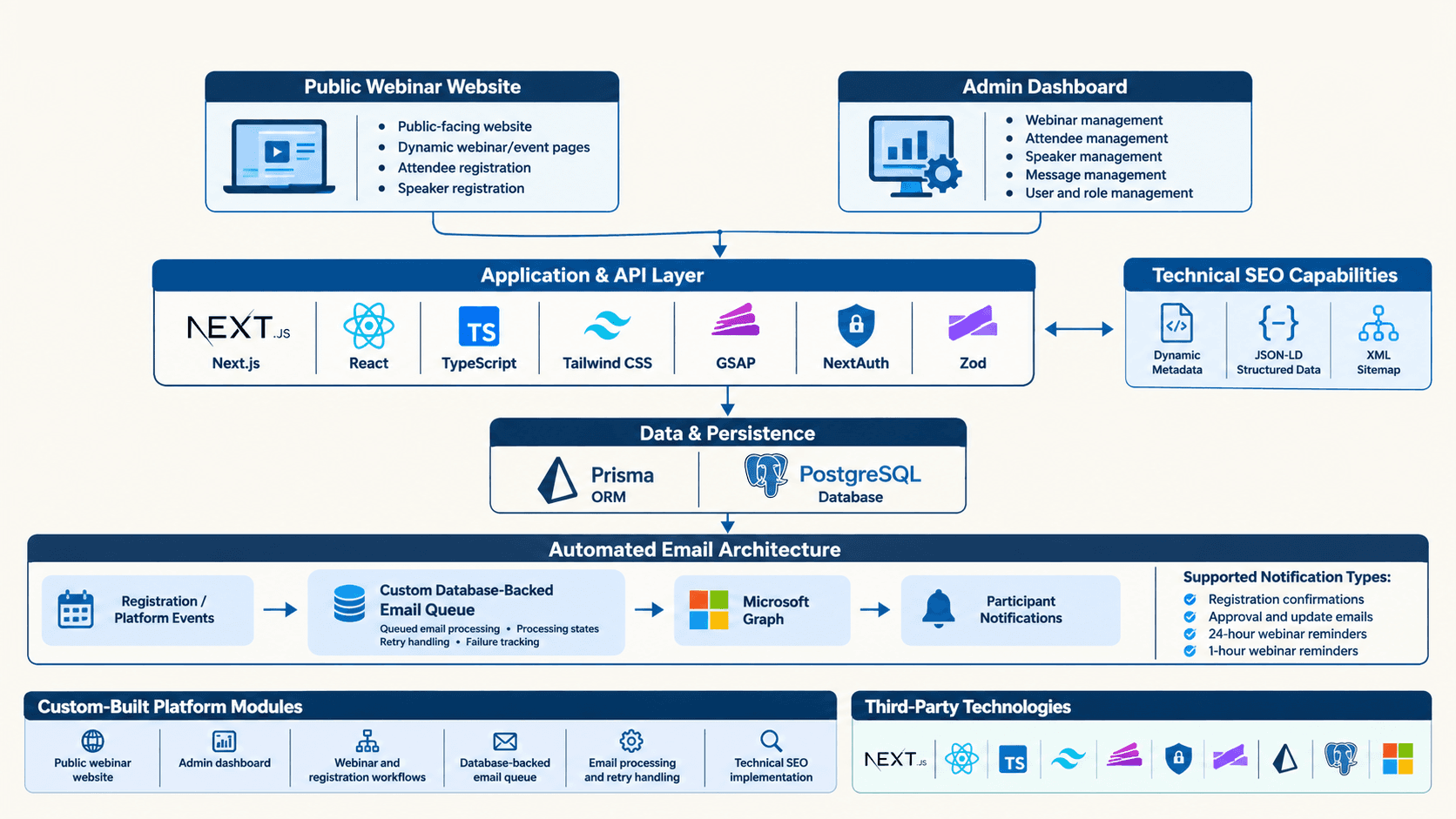
Platform Architecture at a Glance
How We Developed the Webinar Management Platform
The project brought together interface development, application architecture, data management, administration workflows, and communication automation.
Step 1 - Platform planning and UI/UX design
We structured the public and administrative experiences around the needs of visitors, attendees, speakers, and platform administrators.The goal was to make initiative information and webinar participation accessible while keeping management workflows organized.
Step 2 - Public website development
We developed the public-facing website using Next.js and React, creating the core initiative, team, contact, and webinar experiences.The application was structured to support dedicated pages and reusable interface components.
Step 3 - Dynamic webinar management
We implemented webinar listing and detail experiences backed by application data.The pages support event information such as descriptions, schedules, duration, speakers, meeting details, and recordings.
Step 4 - Attendee registration workflow
We developed an attendee registration flow that collects contact, professional, organization, country, and consent information.Submission validation and duplicate-registration handling help keep the registration process structured.
Step 5 - Speaker registration and review
We built a separate speaker application workflow for professional details, talk abstracts, biographies, expertise, profile links, and photo uploads.The dashboard includes a speaker approval workflow for authorized administrators.
Step 6 - Custom dashboard and access control
We developed a separate administration application with authenticated access and role-based permissions.Administrators can work with webinar content, attendee and speaker records, messages, and dashboard users.
Step 7 - Email automation and queue processing
We integrated Microsoft Graph for platform email communications, including registration-related messages, speaker approval updates, webinar notifications, and participant reminders.A database-backed outgoing email queue tracks delivery states and supports retry handling for eligible failures.
Step 8 - Technical SEO and structured data
We implemented dynamic metadata, canonical URLs, social sharing metadata, and structured data for relevant website, organization, event, speaker, and video content.A dynamic XML sitemap supports discovery of static pages and generated webinar and speaker pages.
Registration Experiences Designed for Different Participants
Attendees and speakers have different reasons for using the platform, so their registration experiences were developed as separate workflows rather than a single generic form.
Attendee registration : The attendee form collects a participant's name, job title, email, phone number, organization, country, and biography, along with the required consent preferences. The submission flow includes validation and duplicate-registration checks.
Speaker applications : The speaker form captures professional information, talk abstract, biography, areas of expertise, official and LinkedIn profile links, consent preferences, and a profile photograph.
Administrative review : Speaker applications are connected to the dashboard, where authorized users can review and manage speaker approval. Approval transitions can trigger the corresponding communication workflow.
A Custom Dashboard for Webinar Operations
The administration dashboard is a separate part of the platform, built to give the team a centralized workspace for day-to-day webinar operations. Authentication and role-based access help ensure that dashboard capabilities are available according to user permissions.
Webinar management : Create and manage webinar information, descriptions, schedules, meeting instructions, platform details, and recording information.
Attendee management : Access and manage attendee registration records collected through the public website.
Speaker management : Review speaker applications and manage speaker approval and webinar-speaker associations.
Message management : Access messages submitted through the public website and manage them through the dashboard.
Dashboard user permissions : Role-based navigation and access distinguish administrative capabilities from more limited editor access.
Automated Email Communications and Reliable Delivery Handling
Email communication is an important part of webinar operations. The platform integrates Microsoft Graph to support registration messages, speaker approval communications, webinar updates, and participant reminders.
Event-related email notifications : The application supports email communication associated with attendee registration, speaker approval, and webinar updates.
Scheduled participant reminders : The reminder workflow queues messages for upcoming webinars, including 24-hour and one-hour reminders for registered participants.
Database-backed email queue : Outgoing messages are tracked through processing states such as pending, processing, sent, retrying, failed, and cancelled. The queue also records attempts and relevant failure information.
Retry handling : The email processor claims queued messages for processing and retries eligible transient delivery failures using a backoff approach, with a defined attempt limit.
Technical SEO for Website and Webinar Discovery
The platform's SEO implementation covers both its main website pages and its dynamic webinar and speaker content. The objective was to provide search engines with relevant page information and structured context as the platform grows.
Dynamic page metadata : Page titles and descriptions are configured for the relevant website and dynamic content pages.
Canonical and social metadata : Canonical URLs and Open Graph and Twitter metadata support page identification and social sharing previews.
Structured data implementation : Structured data helpers cover organization, website, webpage, event, person, speaker, and video-related information where applicable.
Dynamic XML sitemap : The sitemap includes the relevant static pages alongside dynamically generated webinar and speaker pages.
Project Outcomes: One Connected Platform for Webinar Operations
The delivered platform brings the public webinar experience and its supporting administrative operations into one connected application. Instead of relying on disconnected website pages and manual processes, the team has dedicated workflows for discovery, registration, management, and communication.
A dedicated digital presence for the initiative : Visitors can explore the initiative, its team, and its webinar activities through a dedicated public website.
Structured webinar discovery : Dynamic listing and detail pages organize event information, speakers, schedules, registration, and recordings.
Separate attendee and speaker journeys : Purpose-built registration workflows collect the information needed from participants and prospective speakers.
Centralized administrative operations : The custom dashboard provides authorized users with tools to manage webinars, attendees, speakers, messages, and user access.
Connected email communication : Microsoft Graph integration and queue-based processing support platform notifications and scheduled webinar reminders.
A structured technical SEO foundation : Dynamic metadata, canonical URLs, structured data, and sitemap generation support the website's search engine discovery requirements.
The project demonstrates how a purpose-built web application can connect the public experience with the operational workflows required to manage an ongoing webinar initiative.
Frequently Asked Questions
What was developed for the webinar initiative?
ArtographerTacts designed and developed a complete webinar management platform. It includes a public-facing website, dynamic webinar pages, attendee and speaker registration workflows, a custom admin dashboard, automated email communications, and technical SEO implementation.
What technologies were used to develop the platform?
The platform uses Next.js, React, TypeScript, Tailwind CSS, PostgreSQL, and Prisma. It also integrates NextAuth for authentication and Microsoft Graph for email communications.
Does the platform support both attendee and speaker registration?
Yes. Attendees can register with their professional and contact details, while prospective speakers can submit their profiles, talk abstracts, expertise, professional links, and profile photographs.
What can administrators manage through the dashboard?
Authorized dashboard users can manage webinars, attendees, speakers, messages, and dashboard users. Webinar management also includes scheduling information, meeting details, recording information, and speaker approval workflows.
How does the automated webinar email system work?
The platform uses Microsoft Graph to send transactional and webinar-related emails. A database-backed outgoing email queue tracks processing status, retries eligible failed deliveries, and supports scheduled attendee reminders, including 24-hour and one-hour reminders.
Was technical SEO included in the project?
Yes. The implementation includes dynamic metadata, canonical URLs, Open Graph and Twitter metadata, structured data for relevant website entities and webinar content, and a dynamically generated XML sitemap.
Need a Custom Web Application for Your Business?
From public-facing platforms to custom dashboards and automated workflows, we build connected web applications around real operational needs.

Ready to get started?
Let’s craft your next digital story
